
MX Player
Amazon Mobile LLCVideo Players & Editors
4.2162.74K Reviews
- Version
- 3.4.3
- Installs
- 1.00B
- Age Rating
- Everyone
Screenshots
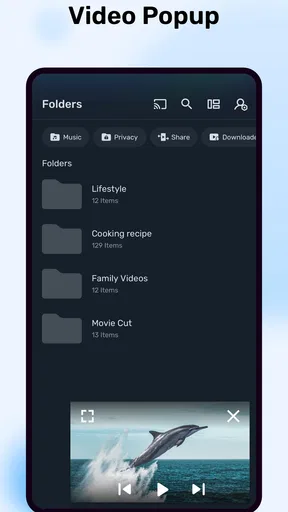
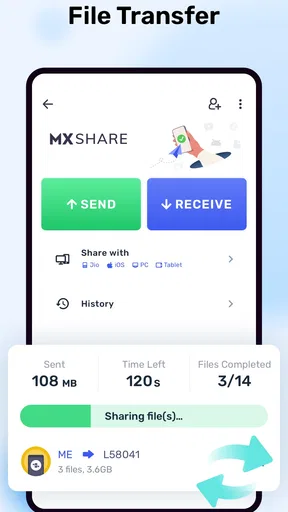
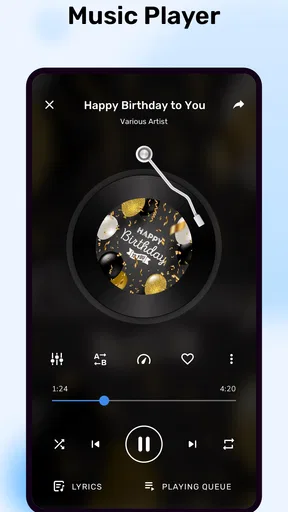
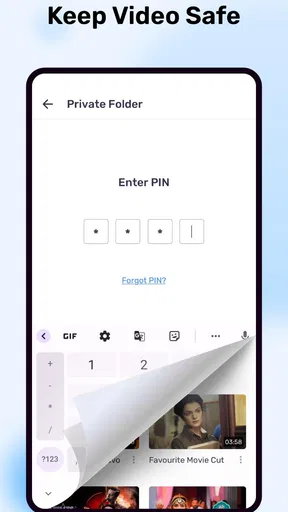
Our Review of MX Player
 Analysis by Appyee
I think the best way to judge a mobile video player is to ask what happens when you already have a video you want to watch, rather than when you are browsing for something new. That is where MX Player makes its clearest case: it is built around playing personal video files, with controls and subtitle tools that can make a phone or tablet feel less like a compromise. It is a free video player and editor app from Amazon Mobile LLC, though the experience also reaches into online entertainment. That mix is useful, but it means the app is not quite the same thing as a simple player that opens a file and gets out of your way.
Where it fits in a crowded player category
In my experience, the choice is often between a phone’s built-in player, a streaming service, and a dedicated player such as this one. The built-in option is convenient for quick clips, but it may offer fewer playback adjustments. A streaming service is better when I want a ready-made catalogue and don’t want to manage files. MX Player is more compelling when I already have videos on the device, need subtitles, or want direct control over playback. It does not replace every other video app; it fills a particular gap between a basic gallery player and a subscription-focused streaming app.
That distinction also helps set expectations. A powerful player cannot make a poor source file look better, and online content is a different experience from browsing videos saved locally. I would choose it for flexibility with files, not simply because I expect one app to contain every show I might want. If my main routine is watching content from a single streaming service, that service’s own app is likely the more straightforward choice.
Everyday viewing, with the controls put to work
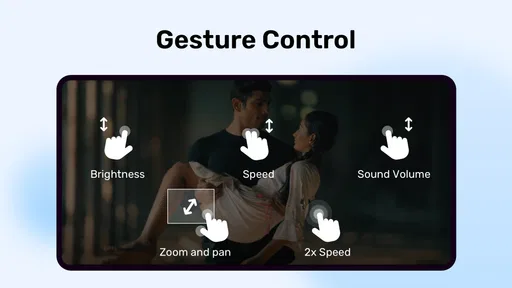
A realistic use case is a downloaded episode on a commute, perhaps with subtitles because the train is noisy or the dialogue is unfamiliar. The gestures make it practical to adjust brightness or volume without pausing to search through menus, and seeking lets me move past a recap or revisit a line. Those shortcuts are most valuable when I’m holding the phone one-handed; they also take a little practice, so I would try them on a short clip before relying on them during a film.
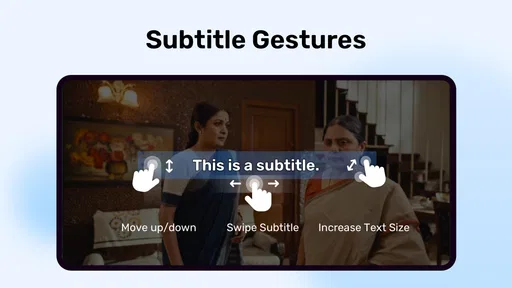
Subtitles deserve more than a quick mention because they can change whether a file is watchable at all. When a subtitle track is available, being able to load it and correct its timing is more useful than simply having a subtitle toggle. If text appears noticeably before or after the dialogue, syncing can rescue the viewing session without forcing me to find another copy. I would still check the subtitle track before settling in: a player can help with timing, but it cannot fix inaccurate translation or missing lines.
Small habits that make playback smoother
For a long video, I find it sensible to test the file, subtitles, and controls before getting comfortable. Start playback, confirm the audio is right, check that subtitles are legible, then make a small seek to see how the file responds. That quick check is especially helpful with a video moved from another device, where the file name may not tell me whether the subtitle track is included or stored separately.
Gesture controls are convenient, but they create a trade-off: a swipe intended to change brightness can be mistaken for a seek if I move across the wrong part of the screen. I would learn where each gesture works rather than swiping casually over the whole display. If I’m sharing the phone with someone who is unfamiliar with the controls, visible playback buttons may be less confusing than gestures until they get used to them.
The app’s hardware acceleration is part of its appeal for demanding playback, but it is not a guarantee that every file will behave identically on every device. If a video stutters or displays oddly, I would first try another playback mode or a different copy of the file before assuming the app itself is at fault. That is a practical distinction: performance depends on the interaction between the video, the device, and the player, not on a feature label alone.
First Impressions and User Interface
When I first opened MX Player, the sleek design caught my eye. It’s pretty intuitive, really. You don’t need to be a tech wizard to navigate through it. The layout is simple, with everything you need just a tap away. The app doesn’t bombard you with unnecessary features, which I appreciate. It’s like having a clean workspace, where you can breathe and focus on what matters – your videos.
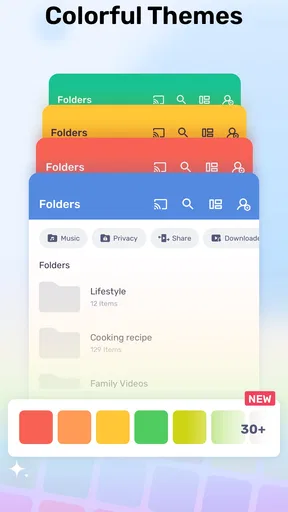
What’s even better is the customization. You can tweak the interface to your liking. Whether it’s changing the theme or organizing your library, the app offers a personalized touch. It’s like having your own mini theater, right in your pocket!
Performance and Features
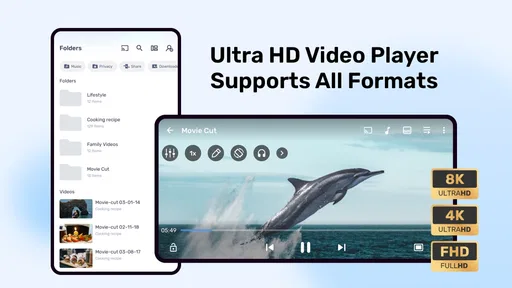
Now, let’s dive into the performance. I have to say, MX Player impressed me with its capability to handle almost any video format. Be it MP4, AVI, or even obscure ones, this app plays them all without a hitch. And trust me, I’ve tested quite a few! The playback is smooth, and the quality? Top-notch. It’s like having your own cinema experience, minus the popcorn, of course.
One feature that stands out is the subtitle support. MX Player allows you to download and sync subtitles seamlessly. It’s a lifesaver, especially when you’re watching foreign films or shows. The app supports multiple languages, so you’re not left hanging if English isn’t your first language.
And let’s not forget about the gesture controls. Swiping up/down to adjust volume or brightness and moving forward/backward in the timeline with a swipe is just… cool. It’s these little things that add to the overall user experience, making it smooth and enjoyable.
Additional Perks
MX Player doesn’t stop at just playing videos. There’s a whole world of online streaming content available. From movies to TV shows, and even web series, there’s something for everyone. It’s like having Netflix and YouTube combined in one app. The variety is refreshing, and it keeps you entertained for hours.
Another highlight is the Kids Lock feature. If you’re a parent, you’ll love this. It ensures that your kids can’t accidentally exit the video or make any unwanted calls or messages. It’s a small addition, but it makes a world of difference.
What the current version means for regular viewers
The current version is 2.13.4, and the app has been available since July 18, 2011. That long presence suggests a mature product rather than a brand-new experiment, while the version number tells me only what build is current—not exactly which features changed along the way. I would not assume a particular recent redesign or new capability from the number alone. For existing users, the useful question is whether the current build still suits their routine: opening local files, handling subtitles, and reaching the playback controls they rely on.
For someone returning after time away, I’d spend a minute checking the interface and playback preferences instead of expecting every control to be exactly where memory puts it. Video apps can evolve, and small changes to a familiar layout may affect muscle memory more than the actual viewing quality. If a setting matters to your routine, test it before a long trip or family movie night rather than discovering a change halfway through.
Limits, cost, and who should choose something else
The app is free to install, but that does not mean every part of the experience is necessarily free of friction. In-app purchases range from $0.49 to $239.99 per item, so I would check the specific purchase screen carefully before confirming anything and avoid treating the broad range as a single subscription price. The free option is a reasonable place to begin if I mainly want a local player; people who dislike ads or interruptions should decide whether the available paid choice addresses their particular concern before spending.
Its online content can be a bonus, but it also makes the app feel busier than a bare-bones player. If I only want to tap a file in my phone’s gallery and watch it, a simpler built-in player may be enough. If I want a curated catalogue, recommendations, and a consistent streaming experience, a dedicated streaming service is usually a better fit. MX Player makes most sense when file playback and hands-on controls matter more than having one polished destination for all entertainment.
Parents may appreciate Kids Lock for preventing accidental exits during a video, but I would still set up the device and choose the content myself. A playback lock is not a substitute for deciding what a child can access elsewhere on the phone. Similarly, a subtitle feature helps with language and accessibility, but the result depends on the subtitle file being suitable and timed correctly. These are useful tools, not automatic solutions to every viewing problem.
How I would decide whether to keep it
MX Player has an average rating of 4.2 from around 14 million ratings, with about 164,000 written reviews and more than a billion installs. Those figures show that it is widely used, but popularity alone cannot tell me whether its interface or trade-offs suit a particular person. It is rated for Everyone, and it supports devices running Android 7.0 or later. I would still judge it by a simple personal test: does it open the files I actually watch, make subtitles manageable, and keep the controls comfortable on my device?
It is a strong candidate for people who keep films, classes, recordings, or downloaded episodes on their phone and want more control than a basic player offers. It is less compelling for someone who watches only through streaming subscriptions, avoids ad-supported apps, or prefers a minimal interface with no extra content area. If I were choosing for a friend, I’d suggest trying the free version with one ordinary file and one subtitle-heavy video before making it part of their routine.
Wrap-Up: Is MX Player Worth Your Time?
So, is MX Player worth downloading? Absolutely. Whether you’re a casual viewer or a hardcore video enthusiast, MX Player caters to all. The app’s robust format support, smooth performance, and added entertainment options make it a must-have on your device.
Plus, it’s free! There are ads, but they’re not intrusive enough to ruin your experience. If you want an ad-free experience, there’s a pro version available, but honestly, the free version does a pretty great job.
To sum it up, if you’re looking for an app that combines a powerful video player with a plethora of streaming content, MX Player is the way to go. It’s like having a Swiss Army knife for your video needs, all wrapped up in one neat app. Enjoy your viewing!
What I would watch for next
For an established player, the changes that matter most are often practical rather than flashy: whether familiar controls remain easy to reach, whether subtitle handling continues to work smoothly with common files, and whether playback stays dependable across the devices people already use. Those are the things I would pay attention to when considering future updates, rather than assuming a version number promises a specific feature.
For now, I’d treat it as a flexible everyday player with some extra entertainment options, not as a universal replacement for every video app. If local playback is part of your routine, its controls and subtitle tools can earn their place. If it isn’t, the simpler option you already use may be all you need.
Privacy and Permissions
See what permissions an app requests and how it handles your data.
- Identity
- find accounts on the device, add or remove accounts
- Contacts
- find accounts on the device
- Location
- approximate location (network-based), precise location (GPS and network-based)
- Photos/Media/Files
- read the contents of your USB storage, modify or delete the contents of your USB storage
- Storage
- read the contents of your USB storage, modify or delete the contents of your USB storage
- Camera
- take pictures and videos
- Wi-Fi connection information
- view Wi-Fi connections
- Other
- view network connections, create accounts and set passwords, pair with Bluetooth devices, access Bluetooth settings, change network connectivity, connect and disconnect from Wi-Fi, disable your screen lock, control flashlight, full network access, close other apps, draw over other apps, use accounts on the device, control vibration, prevent device from sleeping, modify system settings
How MX Player Compares
Full ComparisonChoose iTunes for Apple-centered music access, MX Player for feature-rich Android video playback, or VLC for an ad-free, no-purchase media player.
| App | Developer | Rating | Price |
|---|---|---|---|
 iTunes | Apple | 4.7 | Free |
 MX PlayerThis App | Amazon Mobile LLC | 4.2 | Free |
 VLC for Android | Videolabs | 4.0 | Free |
Verdict
Strengths of MX Player
- Supports a wide range of video formats.
- Offers hardware acceleration for smoother playback.
- Includes subtitle support with customization.
- Gesture controls enhance user experience.
- Offline video playback is available.
Limitations of MX Player
- Contains ads in the free version.
- Advanced features require a paid upgrade.
- Subtitle sync can be off at times.
- UI may feel cluttered for new users.
- Some features need internet access.
Other Releases by Amazon Mobile LLC
View All
Amazon Shopping
Shopping4.4

Prime Video
Entertainment4.7

Prime Video
Entertainment3.1

Amazon Kindle: Reading App
Books & Reference4.8
Similar Picks in This Category
View All
Google TV
Google LLC3.9

iTunes
Apple4.7

YouTube
Google LLC3.8

CapCut - Video Editor
Bytedance Pte. Ltd.3.5

PLAYit-All in One Video Player
PLAYIT TECHNOLOGY PTE. LTD.4.5

VivaVideo - Video Cut & Editor
QuVideo Inc. Video Editor & Video Maker App4.3
You May Also Like
View All

Frequently Asked Questions
What features does MX Player offer?
MX Player provides a versatile media experience with support for a wide range of video and audio formats. It includes features like hardware acceleration, multi-core decoding, subtitle support, and a convenient gesture control system for adjusting volume, brightness, and seeking. Additionally, it offers a Kids Lock feature to prevent accidental touches during playback.
Is MX Player available for both Android and iOS?
Yes, MX Player is available for both Android and iOS platforms. You can download it from the Google Play Store for Android devices and the App Store for iOS devices. Both versions offer similar core features, although there may be some platform-specific functionalities and updates.
Does MX Player support online streaming?
While MX Player was initially designed as a local media player, it has evolved to support online streaming. Users can access a variety of online content, including movies, TV shows, and web series directly within the app. The availability of content may vary depending on the region and licensing agreements.
Are there any subscription fees for MX Player?
MX Player is free to download and use, but it also offers a premium subscription called MX Player Pro. The Pro version is ad-free and includes additional features, enhancing the viewing experience. Users can choose between the free version with ads or opt for the one-time purchase of the Pro version to remove ads.
How user-friendly is MX Player for beginners?
MX Player is highly user-friendly, making it accessible even for beginners. The app's interface is straightforward, with intuitive navigation and easily identifiable icons and options. The gesture controls are simple to learn, and the app provides helpful prompts and tooltips for new users to get familiar with its features.
